Case 12784
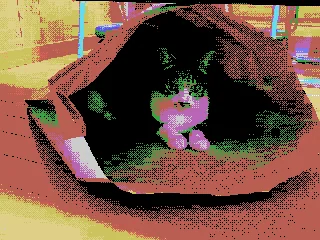
Hardware-level accurate reproduction of Famicom background pixel art
复古像素风红白机8位机点阵图
Prompt
[NES Final Specification / Complete Version: BG-Only Algorithm Execution Type Dot Art Conversion Prompt] Convert this image into BG dot art specifications for Family Computer (NES) hardware, strictly following the mathematical and logical steps below, without limiting the subject matter. The purpose of this prompt is to satisfy the constraints required for BG to function on actual NES hardware. Purely aesthetic NES-style expression is prohibited. Use only the BG layer; sprites are strictly prohibited. ──────────────────────── [Prerequisites (NES BG Implementation Rules)] ──────────────────────── - Output resolution: 256 × 240 pixels - Layer used: NES BG only - Sprite usage prohibited - No transparency processing - Index 0 of each palette is treated as the NES universal background color - Index 0 is shared by all palettes - The color with the largest coverage area on the entire screen is assigned as the universal background color - Color number 0 may also be used as a normal drawing color ──────────────────────── [Step 1: Geometric Image Processing (Protagonist Priority, No Deformation Cropping)] ──────────────────────── 1. Set the conversion size to 256 × 240 pixels 2. Always preserve the aspect ratio of the original image - Scale up or down until the shorter side fits the conversion size - Stretching the image is strictly prohibited 3. Automatically detect the protagonist in the image (person, animal, building, etc.), and adjust the crop position so that the protagonist is included in the frame as much as possible 4. If the protagonist cannot be detected, crop based on the center of the screen ──────────────────────── [Step 2: Tile Decomposition and Attribute Block Definition (NES-Compliant)] ──────────────────────── 1. Divide the image into 8×8 pixel tiles 2. Treat 2×2 tiles (16×16 pixels) as 1 attribute block 3. Subsequent palette and color constraints must be applied per attribute block ──────────────────────── [Step 3: Attribute Block Unit Palette Clustering (Maximum 4)] ──────────────────────── 1. Analyze the color distribution within each 16×16 attribute block 2. Cluster all attribute blocks by similarity in color distribution, classifying them into a maximum of 4 groups 3. If a hue (blue, green, etc.) is clearly different from other areas, treat it as an independent group whenever possible 4. However, NES BG sub-palettes are limited to a maximum of 4. Prioritize the protagonist area, and less important areas may be merged into similar colors ──────────────────────── [Step 4: NES BG Palette Generation (4 Colors × 4 Sets)] ──────────────────────── 1. Index 0 (Universal Background Color) - Calculate the color with the largest coverage area on the entire screen, and assign it to Index 0 shared by all palettes 2. Index 1–3 (Unique Colors) - For each sub-palette, select 3 colors representing the “highlight,” “midtone,” and “shadow” of that attribute group - Colors extremely close to Index 0 in hue or brightness are strictly prohibited ──────────────────────── [NES Palette Constraints (Hardware-Compliant, NTSC)] ──────────────────────── - Available colors are strictly limited to the 54 NES hardware-compliant NTSC palette colors listed below - Palette generation, color selection, and quantization must always be performed from this 54-color set - Generating new colors, RGB interpolation, or using continuous values is prohibited - The following color set contains exactly 54 colors NES NTSC usable palette (54 colors, hex RGB) 000000,1D2B53,7E2553,#008751,AB5236,5F574F, C2C3C7,FFF1E8,FF004D,FFA300,FFEC27,00E436, 29ADFF,83769C,FF77A8,FFCCAA,291814,111D35, 422136,125359,742F29,49333B,A28879,F3EF7D, BE2633,E06F8B,E0A872,B2DCEF,4F6781,8E478C, A3CE27,44891A,2A4F3E,6D758D,9D9D9D,FFFFFF, 4B692F,6A6A6A,8F563B,C2C3C7,DF7126,D95763, D77BBA,FBF236,99E550,6ABE30,37946E,5FCDE4, CBDBFC,ADB5BD,EEC39A,696A6A ──────────────────────── [Step 5: CHR Pattern Compression (BG 256 Tile Limit)] ──────────────────────── 1. Calculate the number of unique 8×8 tile patterns used across the entire image 2. Limit the number of unique tiles to no more than 256 types 3. For large areas such as backgrounds, sky, or walls, repeatedly reuse completely identical dot patterns to minimize the number of tile types 4. Tiles with slight differences may be consolidated using the following methods: - Readjusting dither placement - Replacing intermediate colors - Re-quantization within the attribute block ──────────────────────── [Step 6: Dithering (Supports NES 4-Color Constraint)] ──────────────────────── 1. Use only the 4 assigned colors within each attribute block 2. To express pseudo-gradation, apply the following dithering
More prompts
Case 7732
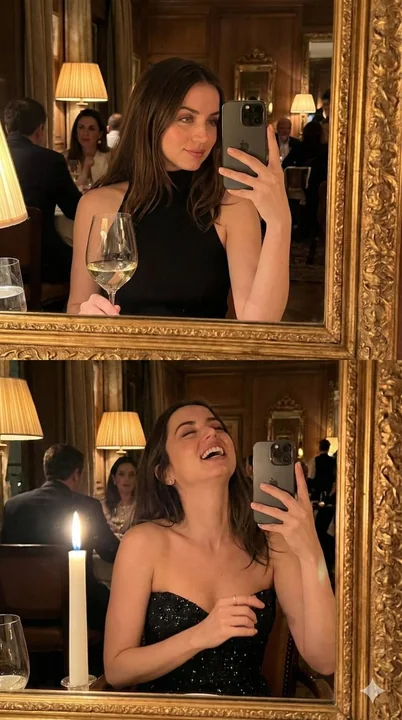
Luxurious vintage restaurant mirror selfie under flickering candlelight
{ "prompt_details": { "subject": { "description": "Young woman with long, voluminous brunette hair featuring soft waves and a center part. She has almond-shaped eyes, arched brows, and defined facial features.", "expressio
自拍复古微醺奢华晚宴

Case 28081
昏暗咖啡馆鼓起腮帮的日本女性手机自拍
{ "direction": "Not an advertising photo, but the kind of ultra-close-up vertical selfie taken by a friend holding a phone to their face in a dim cafe. An adult Japanese woman in her 20s. The character occupies about 85-90% of the screen,