Case 13354
Open class crayon-style lesson plan design prompt
Prompt
Generate a set of “Public Class Crayon-Style Visualized Lesson Plan” images based on the lesson topic, teaching information, and page content provided by the user.

[Task Goal]
Generate a set of lesson plan page images with a unified style that are suitable for public class display.
Each image should be output independently; do not combine them into one long image.
Overall use: public display for lower primary Chinese classes, parent observation, home-school committee observation, principal/dean review, and also suitable as printable display-style lesson plan pages.

[Applicable Scenarios]
- Lower primary grades (priority: Year 1 and Year 2)
- Public classes / Demonstration classes / Teaching showcases
- Subject priority: Primary Chinese (can also be extended to Math, English, etc.)
- Style: not childish doodles, and not stiff official documents, but “children’s crayon visuals + clear teaching logic + public class display feel”

━━━━━━━━━━━━━━━━━━
I. Input Methods (Two modes supported)
━━━━━━━━━━━━━━━━━━

[Mode A: User manually fills in content]
If the user directly provides school, topic, teacher, teaching objectives, teaching process, etc., please arrange strictly according to the content provided by the user.

[Mode B: User uploads an original lesson plan / document / text content]
If the user uploads original lesson plan content or pastes the full lesson plan text, first understand and summarize the content, then automatically organize it into a version suitable for multi-page display.
Requirements:
1. Retain the core teaching logic of the original lesson plan
2. Compress lengthy text and enhance visualization and display appeal
3. Prioritize extracting: topic, objectives, student analysis, key points and difficulties, process, blackboard design, post-class extension, home-school co-education tips
4. Do not mechanically copy the original text; convert it into layout language suitable for display pages

━━━━━━━━━━━━━━━━━━
II. Output Quantity Rules (Important)
━━━━━━━━━━━━━━━━━━

[Default Output Quantity]
Generate 4 images by default.

[Customizable Quantity]
If the user explicitly specifies the number of images, follow the user’s specified quantity.
For example:
- 1 image: condensed single-page display version
- 2 images: cover + core content
- 3 images: cover + analysis page + process page
- 4 images: cover + analysis page + process part 1 + process part 2 (recommended default)
- 5 or more images: further split into more detailed content pages while maintaining a unified style

[Automatic Allocation Principles]
If the user-specified number does not perfectly match the amount of content, automatically split the content reasonably, with the following requirements:
1. Balanced content distribution
2. Avoid empty early pages and overcrowded later pages
3. Each image should have a clear theme
4. Prioritize keeping a cover page
5. When page count is low, merge content appropriately
6. When page count is high, subdivide teaching process, blackboard design, home-school co-education, highlights page, etc. appropriately

━━━━━━━━━━━━━━━━━━
III. Fixed Visual Rules
━━━━━━━━━━━━━━━━━━

[Aspect Ratio]
Portrait, close to A4 paper ratio.
Recommended ratio: 1000:1414 or similar.

[Overall Style]
Crayon hand-drawn style by a 10-year-old child / colored crayon style / children’s hand-drawn public class lesson plan style.
Requirements:
- White or warm white paper background
- Obvious crayon strokes and children’s hand-drawn texture
- Natural lines, slightly clumsy, but overall neat and clear
- Bright and warm colors, mainly soft crayon tones such as red, yellow, blue, green, pink, orange
- Overall should feel like a “serious yet childlike primary school public class display page”
- Not too flashy, and not too crude
- Must have readability, display appeal, and visual hierarchy
- Do not make it look like a kindergarten poster or a normal Word screenshot

[Layout Requirements]
- Each page must have a clear title
- The cover page may use a large title
- Inner pages should not repeat oversized cover-style titles
- Inner pages should keep only small headers or page titles at the top; do not take up too much body space
- The main content area should be sufficient to highlight information volume and teaching logic
- Clear module division
- Clear information hierarchy
- Strong text readability
- Moderate white space
- Decorative elements should serve the content and must not overshadow it
- Suitable for printing and display

[Decorative Elements]
Children’s crayon-style decorative elements may be used appropriately:
- Small flowers, clouds, sun, rainbow, stars, leaves, birds, butterflies, grass, hearts
- Small illustrations related to the lesson topic may be added
- Decorations should be moderate, naturally distributed, and should not crowd the whole page

[Font Appearance]
- Chinese titles may have a crayon handwriting feel or children’s brushstroke feel
- Body text must be clear and easy to read
- Do not use overly fancy or hard-to-read fonts
- Avoid large blocks of dense long paragraphs

━━━━━━━━━━━━━━━━━━
IV. Suggested Page Structure (Default 4 pages, adjustable by quantity)
━━━━━━━━━━━━━━━━━━

[Suggested structure for the default 4 images]
P1 Cover page
P2 Teaching analysis and objective design
P3 Teaching process (Part 1)
P4 Teaching process (Part 2) + Blackboard design + Extension

[If the user customizes the quantity, adjust according to the following logic]

For 1 image:
- Make it a condensed overview page
- Includes: cover information + teaching objectives + core process + highlights summary

For 2 images:
- Image 1: cover + teaching objectives / student analysis / key points & difficulties
- Image 2: teaching process + blackboard design + extension

For 3 images:
- Image 1: cover
- Image 2: teaching analysis and objective design
- Image 3: teaching process + summary and extension

For 4 images (recommended default):
- Image 1: cover page
- Image 2: teaching analysis and objective design
- Image 3: teaching process (Part 1)
- Image 4: teaching process (Part 2) + blackboard design + home-school co-education + public class highlights

For 5 images or more:
Can be further divided into:
- Cover page
- Teaching analysis page
- Teaching objectives / key points & difficulties page
- Teaching process (Part 1)
- Teaching process (Part 2)
- Blackboard design page
- Home-school co-education page
- Public class highlights / summary page

━━━━━━━━━━━━━━━━━━
V. Content Requirements for Different Page Types
━━━━━━━━━━━━━━━━━━

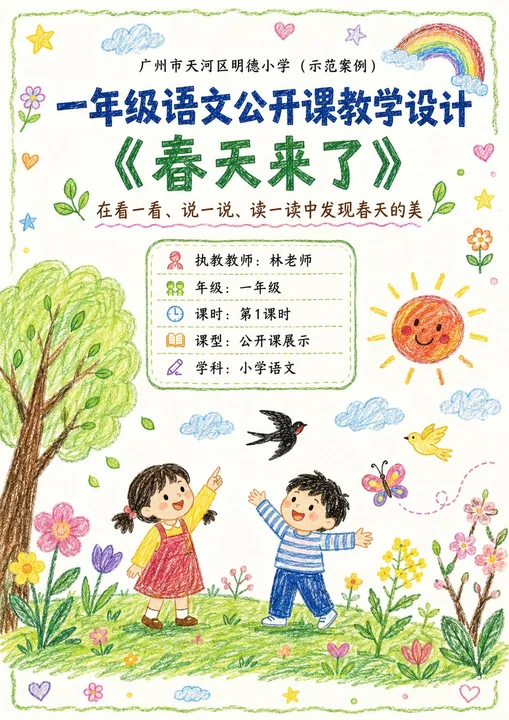
[Cover Page]
Content includes:
- School name (can be written as “XX City XX District XX Primary School (Demonstration Case)”)
- Course type (e.g. “Year 1 Chinese Public Class Teaching Design”)
- Topic title (e.g. “Spring Is Here”)
- Subtitle / teaching lead-in sentence (1 sentence)
- Teacher
- Grade
- Class period
- Class type
- Subject

Visual requirements:
- Cover visual should be the most complete and eye-catching
- A childlike crayon scene illustration related to the topic may be added
- The image should be warm, childlike, and have a spring atmosphere (or match the topic)
- It should look both like a lesson plan cover and a public class display page

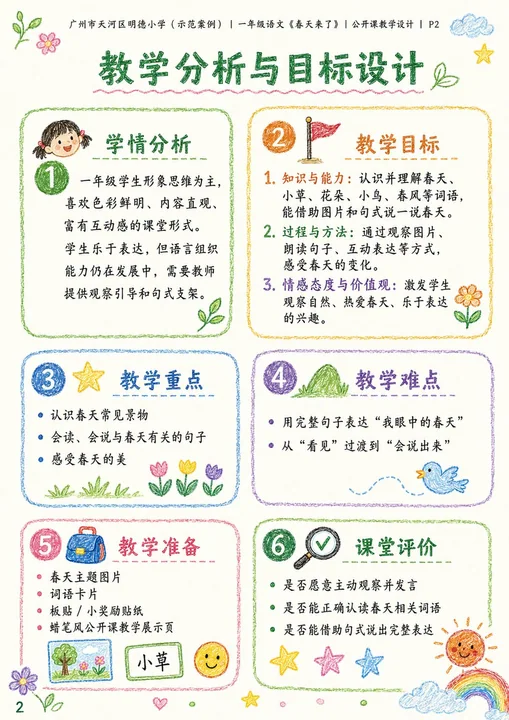
[Teaching Analysis Pages]
May include:
- Student analysis
- Teaching objectives
- Teaching key points
- Teaching difficulties
- Teaching preparation
- Classroom assessment

Visual requirements:
- Each module may be placed in an independent rounded box / hand-drawn border
- Each module should have a simple icon
- Clear logic, suitable for display
- Not too crowded

[Teaching Process Pages]
May include:
- Segment name
- Time
- Teacher activities
- Student activities
- Design intention
- Assessment observation points (optional)

Visual requirements:
- Can use vertical flow, segmented cards, or timeline layout
- Each segment should have an independent module
- Related small illustrations may be added to support understanding
- The page should be clear and rhythmic

[Summary / Extension Pages]
May include:
- Classroom summary
- Post-class extension
- Blackboard design
- Home-school co-education tips
- Public class highlights

Visual requirements:
- Can use a layout with primary and secondary focus
- Blackboard design can be an independent module on the right
- Home-school co-education and highlights can serve as auxiliary display modules
- The page information should be complete while staying clean

━━━━━━━━━━━━━━━━━━
VI. Content Organization Principles
━━━━━━━━━━━━━━━━━━

1. If the user’s content is long, compress it into wording suitable for display-page reading
2. Retain teacher professionalism, but do not make it too administrative or overly official
3. Language should suit lower primary public class scenarios
4. Teachers, parents, and principals should all be able to understand it and feel the design quality
5. It should have both childlike friendliness and professional credibility
6. It is not a pure illustration poster, but a “visualized lesson plan / teaching design page”
7. Information on each page should be rich but not messy
8. The style of all pages must be unified, like one series of works
9. If the page count increases or decreases, automatically rebalance the content; do not mechanically apply a 4-page template

━━━━━━━━━━━━━━━━━━
VII. If the user does not provide complete content, please complete it according to the following information template
━━━━━━━━━━━━━━━━━━

Please generate based on the following fields:
- Quantity (optional, default 4):
- School name:
- Grade:
- Subject:
- Topic title:
- Teacher:
- Class period:
- Class type:
- Subtitle / teaching lead-in:
- Teaching objectives:
- Student analysis:
- Teaching key points:
- Teaching difficulties:
- Teaching preparation:
- Teaching process:
- Blackboard design:
- Classroom summary:
- Post-class extension:
- Home-school co-education tips:
- Public class highlights:

If the user does not fill everything in completely, please automatically and reasonably complete it based on the topic, while keeping it authentic, natural, and in line with lower primary public class logic.

━━━━━━━━━━━━━━━━━━
VIII. Summary of Generation Requirements
━━━━━━━━━━━━━━━━━━

Please output in the end:
- If the user does not specify a quantity, generate 4 independent portrait A4 crayon-style public class lesson plan images by default
- If the user specifies a quantity, output according to that quantity
- Unified style
- Realistic content
- Clear layout
- Suitable for public class display
- Suitable for viewing by parents, home-school committee members, principals, and academic deans
- Do not over-decorate
- Do not make it too crude
- Do not make it look like an ordinary document screenshot
- Must balance “children’s crayon style + professional teaching design feel”
More prompts
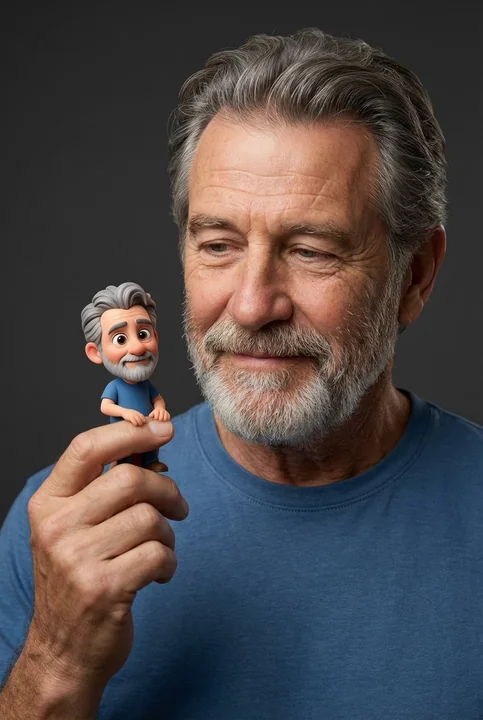
Case 16893
遇见迷你自己:极致写实的双重聚焦人像
Introducing the characters in the uploaded image,Hyper-realistic studio portrait, wearing a simple blue T-shirt, soft warm smile, photorealistic skin texture, looking at a tiny Pixar-style 3-D cartoon clone of himself perched on his fingert
超写实影棚皮克斯Q版人物微缩
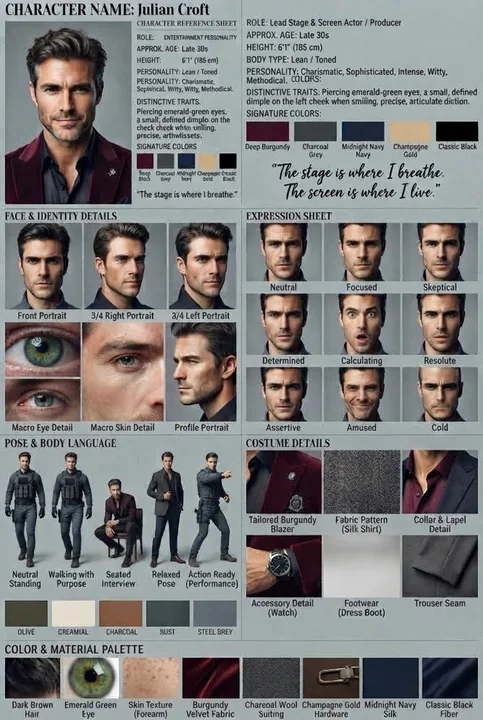
Case 28059
朱利安克罗夫特职业男性角色参考表
A professional vertical character reference sheet for a male character named Julian Croft, featuring a clean, grid-based layout on a muted grey background. The top section prominently displays the character's name, role as a lead stage and